Showing posts with label Tutorial. Show all posts

April 28, 2010

Sony Ericsson CID52 Full Flash Video Tutorial By SE Tool

0 comments
About one week after the last post in this blog. Full job and busy, I miss to post again. It's time to post. Here is Sony Ericsson CID52 Full Flash Tutorial Video by Se Tool.
Right Here to Download the video. Size : 316 kB
For another tutorial video please jump to this page :
http://cellular-tricks.blogspot.com/p/tutorial_23.html. There are many video of SE Tool Video Tutorial. For the next repair box tutorial video, wait on another post. Don't miss it..

April 20, 2010

Refreshing : Let's Collect Dollars

0 comments
This day, I have a good news for you. One of Top Internet Marketer in the world, makes Pay Per Lead (PPL) Program. He is Mr. Justin Michie.
Our job is very-very simple and easy, we just recommended to all of our friends to download his Book. 100% Free.The book names "The Street Smart Internet Marketing". He will earn $1 for us each one man to downloaded his free Internet Marketing E-Book.
This program is valid April 15-30, 2010 only. So, lets we starts.. This is the steps :

1. Open this link http://www.internetmarketingbook.com/cmd.php/?af=1175050
2. Enter your name & email, and than click "YES... Send My FREE Gift Now!"
3. Display will shown "ONE TIME SPECIAL OFFER ...", just leave this message..
4. Check your email from Mr. Justin Michie
5. There are 2 links in your email, download his e-book first "The Street Smart Internet Marketing" in PDF format on the top link, and than click the second link to sign up a new PPL program member.
6. Fill the registration form and than "Click Here To Join"
7. Check your email again for get the affiliate link.
Very simple steps, and don't forget this program is valid until April 30, 2010. $1 is not too bad for me, how about you.

April 15, 2010

PDA / Smart Phone Master Reset Tricks Collections

0 comments
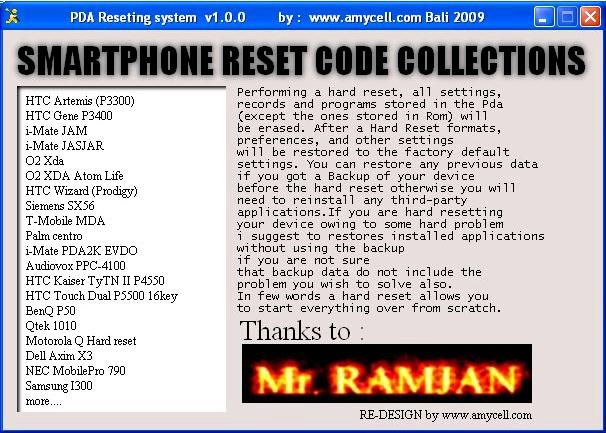
Talking about smart phone, when you have a software problem. I think you can handled this trouble without anyone help and without go to service center. It is very simple step. This collections have compiled too in a exe program, and many type of smart phone collected in this program. Here is the screen shot :Many type of smart phone and PDA master reset and hard reset tricks such as HTC, O2 XDA, Samsung, BenQ, Palm, NEC, Dell and more. In this program contains tutorial in text and picture to help and make easy the steps. And the last, I hope its useful.
Download Smart Phone & PDA Master Reset Tricks Collections

April 08, 2010

Nokia CDMA Flashing With PHOENIX Video Tutorial

0 comments
This software used for flash many type of Nokia CDMA, firmware flash or signal tuning, and everything about Nokia phone test and service. Not used flasher box, and only need a USB cable.

March 25, 2010

"Wajanbolic" Frying Pan 2.4GHz USB Wifi Antena

0 comments
This tutorial formated in PDF file. Its contains how to make 2.4GHz Wireless LAN Homebrew Antenna. But not only how to make USB wifi antenna, but also contains everything about WIFI and wireless LAN. How to install WIFI transmitter, local network and how to install USB Wifi Receiver included how to make Wajanbolic antenna.

Wajanbolic created from two word. Wajan : frying pan (Indonesian) and Bolic : parabolic.

Not only that, this tutorial also give information to you how to make Biderectional Antenna, Omni Antenna, 8 Quad Antenna.

Everything about WIFI is here. But remember.. Don't use this hardware to craked protected network, use for legal & free internet network.. I'm warning you.. Use at your own risk..
DOWNLOAD WIRELESS LAN 2.4GHz HOMEBREW TUTORIAL Size : 2.94MB

Nokia 1200, 1600, 2310 No Signal Software Problem Tutorial Video

0 comments
There are two problem if your Nokia 1200, 1600 or 2310 no signal. It's can caused a hardware problem or software problem. Hardware problem maybe caused antenna switch broken, or RF IC, or another hardware fault. But if your hardware component was believed OK, test your signal problem about software installation, this is the tutorial to fix your Nokia 1200, 1600, and 2310 signal problem tutorial video with UFS HWK flasher box.
Download Nokia 1200, 1600, 2310 Signal Problem Video Tutorial with UFS HWK
Size : 407kB
I hope it helpful.. :-)

March 17, 2010

Repair GDFS Sony Ericsson Tutorial By The New SE Tool 1.0 Final

0 comments
Se Tool v1.0 was released with many free most feature. Repair GDFS without credit.. And more.. This video is repair gdfs by SE Tool v1.0 Final.

February 21, 2010

CPF BOX II Installation Tutorial

0 comments
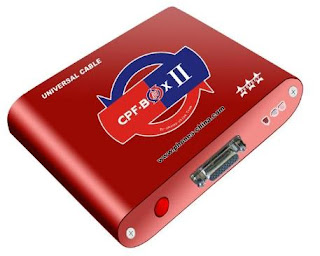
Tutorial How To Install CPF BOX II Flasher, Chinese Phone Specialist

Main Software Installation
1. Install the CPF BOX II main software by click 2 times on CPF_BOX_II_SETUP 2008.08.07
2. Then click NEXT to continue installation.
3. Put the installation files in the folder C:\CPF_BOX II.
4. Location is also installer in C:\CPF_BOX II so as not to interfere with existing data on the driver D:\ and click NEXT
5. Check or mark the Create A Desktop Icon to create the desktop computer shortcut
6. Click INSTALL to continue CPF BOX II installation
7. Wait for the installation process went to completion, and then click Finish when done.

Update CPF Box II
1. Click 2x on the CPF BOX II_UPDATE_20090115 for the latest version CPF Box II
2. For the destination folder, select the folder as the location of major software installer is C:\CPF_BOX_II.
3. Then click NEXT for the continuation of the software update installation process and wait until finished.

Pairs CPF BOX II to Computer
1. After installation process, pairs of CPF BOX II to the computer.
2. Connect power adapter for CPF Box, because it still need additional power to order the maximum box.
3. Press the power ON/OFF to turn on CPF BOX
4. Then plug the USB cable into the port box and into PC.
5. Install CPF Box drivers manually selected by ADVANCE and click NEXT
6. Look location of the driver C:\CPF_BOX_II
7. Select the folder and then select the folder usb_driver then click OK PL2303
8. Make sure the correct drivers taking the address, then click NEXT
9. Then click continue to proceed anyway, when finished click FINISH
10. Box is ready for use, I hope to help. Wassalam.

February 20, 2010

HWK UFS Instalation Tutorial Without Online

0 comments
Please don't wrong perception, this post isn't to handled problem installation in the first installation of your new UFS HWK. But it used to help you all in 2nd installation and more before after UFS HWK has been registered.
For the first installation or the new registered, you should Install UFS Driver, HWK Support Suite, Install UFS Suite Setup and Online HWK Update Client.
The key is you must backup REGISTRY FILE in Windows to avoid the next installation without Online Update Client. Follow this step to backup REGISTRY FILE.
1. Click START choose RUN, on RUN field, fill REGEDIT
2. Choose HKEY_LOCAL_MACHINE, SOFTWARE and SARASOFT
3. On the SARASOFT, right click and choose EXPORT and then save the registry file.
All right, used the registry file that has been saved for the next Installation of UFS HWK.
For the tutorial video please download from the link below:
UFS HWK Installation Tutorial Without Online
In the end I hope it helpful.
 

Copyright 2010 Http://cellular-tricks.blogspot.com Revolution Two Church theme by Brian Gardner Converted into Blogger Template by Bloganol dot com Free Blogger Templates