April 28, 2010

Sony Ericsson CID52 Full Flash Video Tutorial By SE Tool

0 comments
About one week after the last post in this blog. Full job and busy, I miss to post again. It's time to post. Here is Sony Ericsson CID52 Full Flash Tutorial Video by Se Tool.
Right Here to Download the video. Size : 316 kB
For another tutorial video please jump to this page :
http://cellular-tricks.blogspot.com/p/tutorial_23.html. There are many video of SE Tool Video Tutorial. For the next repair box tutorial video, wait on another post. Don't miss it..

April 20, 2010

Refreshing : Let's Collect Dollars

0 comments
This day, I have a good news for you. One of Top Internet Marketer in the world, makes Pay Per Lead (PPL) Program. He is Mr. Justin Michie.
Our job is very-very simple and easy, we just recommended to all of our friends to download his Book. 100% Free.The book names "The Street Smart Internet Marketing". He will earn $1 for us each one man to downloaded his free Internet Marketing E-Book.
This program is valid April 15-30, 2010 only. So, lets we starts.. This is the steps :

1. Open this link http://www.internetmarketingbook.com/cmd.php/?af=1175050
2. Enter your name & email, and than click "YES... Send My FREE Gift Now!"
3. Display will shown "ONE TIME SPECIAL OFFER ...", just leave this message..
4. Check your email from Mr. Justin Michie
5. There are 2 links in your email, download his e-book first "The Street Smart Internet Marketing" in PDF format on the top link, and than click the second link to sign up a new PPL program member.
6. Fill the registration form and than "Click Here To Join"
7. Check your email again for get the affiliate link.
Very simple steps, and don't forget this program is valid until April 30, 2010. $1 is not too bad for me, how about you.

I-Phone Smart Phone Secret Code Collections

1 comments
In this posting I try to collect many codes of I-Phone smart Phone from Apple, many codes such as, check your phone IMEI, Enter to filed mode like BIOS mode in computer and more. Hopely this post is useful. And please feel free to leave a comment if yu like this post..
*3001#12345#* and tab Call. Enter Field Mode.
Field mode reveals many of the inner settings of your iPhone, specifically up-to-date network and cell information.

*#06# Displays your IMEI. No need to tap Call.
IMEI is the unique identifier for your cell phone hardware. Together with your SIM information it identifies you to the provider network.

*777# and tab Call. Account balance for prepaid iPhone.
*225# and tab Call. Bill Balance. (Postpaid only)
*646# and tab Call. Check minutes. (Postpaid only)
These three are pretty self explanatory.
*#21# and tab Call. Setting interrogation for call forwards.
Discover the settings for your call forwarding. You'll see whether you have voice, data, fax, sms, sync, async, packet access, and pad access call forwarding enabled or disabled.
*#30# and tab Call. Calling line presentation check.
This displays whether you have enabled or disabled the presentation of the calling line, presumably the number of the party placing the call.

*#76# and tab Call. Check whether the connected line presentation is enabled or not.
State whether the connected line presentation is enabled or disabled. Presumably similar to the calling line presentation.
*#43# and tab Call. Determine if call waiting is enabled.
Displays call waiting status for voice, data, fax, sms, sync data, async data, packet access and pad access. Each item is either enabled or disabled.

*#61# and tab Call. Check the number for unanswered calls.
Show the number for voice call forwarding when a call is unanswered. Also show the options for data, fax, sms, sync, async, packet access and pad access.

*#62# and tab Call. Check the number for call forwarding if no service is available.
Just like the previous, except for no-service rather than no-answer situations.

*#67# and tab Call. Check the number for call forwarding when the iPhone is busy.
And again, but for when the iPhone is busy.

*#33# and tab Call. Check for call control bars.

April 15, 2010

PDA / Smart Phone Master Reset Tricks Collections

0 comments
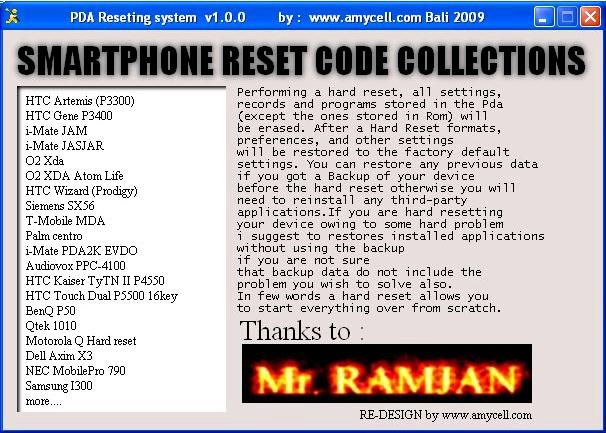
Talking about smart phone, when you have a software problem. I think you can handled this trouble without anyone help and without go to service center. It is very simple step. This collections have compiled too in a exe program, and many type of smart phone collected in this program. Here is the screen shot :Many type of smart phone and PDA master reset and hard reset tricks such as HTC, O2 XDA, Samsung, BenQ, Palm, NEC, Dell and more. In this program contains tutorial in text and picture to help and make easy the steps. And the last, I hope its useful.
Download Smart Phone & PDA Master Reset Tricks Collections

April 09, 2010

Nokia N73 Keypad Tracks

0 comments
This thread for your Nokia N73 RM-133 on keypad or joysticks fault. Maybe hang, may be not functioned or another trouble.Picture : Nokia N73 RM-133 Keypad & Joysticks Tracks Ways & Jumper Tricks
Click on the picture to save or view in the real size
 

Copyright 2010 Http://cellular-tricks.blogspot.com Revolution Two Church theme by Brian Gardner Converted into Blogger Template by Bloganol dot com Free Blogger Templates